REVIEW · TOKYO
Japan: eSIM with Unlimited Local 4G/5G Data
Book on GetYourGuide →Operated by LINK KOREA · Bookable on GetYourGuide
A Japan eSIM is one less thing to worry about, and this one focuses on unlimited local 5G/4G with a quick QR setup. I like that it uses KDDI(au) for coverage across Japan, and it’s designed to work fast after you land. The other big win is simplicity: scan, connect, and go without hunting for a physical SIM. One drawback to plan around: this eSIM lists no voice calls or SMS, so you’ll rely on data apps for messaging.
There are a couple timing details that matter. The QR code from the GetYourGuide voucher is not the real eSIM QR, and the correct QR is emailed to you 1 day before your activity date. Also, 5G can drop to 4G in indoor or crowded spots, which is normal for Japan networks.
In This Review
- Key things to know before you land
- eSIM setup in Japan: your QR code does not match the voucher
- Ultra vs Lite: what the 10Mbps cap really means for a trip
- Ultra: unlimited local data, no throttling
- Lite: unlimited data, but max speed 10Mbps
- Duration choices (and why that matters)
- KDDI(au) coverage and the subway reality check
- Hotspot sharing: when unlimited turns into limits
- Day-by-day connection plan: timing, activation, and troubleshooting
- What to do when you land
- What if you get stuck with QR code issues
- Quick device habits that save time
- Price and value: is $10 a smart deal?
- This is strong value if you…
- This may be less ideal if you…
- Who should book this Japan eSIM plan (and who should skip it)
- Should you book this Japan eSIM plan?
- FAQ
- Where does the correct eSIM QR code come from?
- When should I install and activate the eSIM?
- What should I do if I see a QR code is invalid message?
- How can I tell if my phone supports eSIM?
- Can I use this eSIM for calls and SMS?
- Can I share the connection with a hotspot?
- Will I be able to get a refund after the QR code is sent?
Key things to know before you land
- Voucher QR is not the eSIM QR: your real QR code arrives by email 1 day before.
- Install the eSIM within 30 days of purchase, then activate it after arriving in Japan.
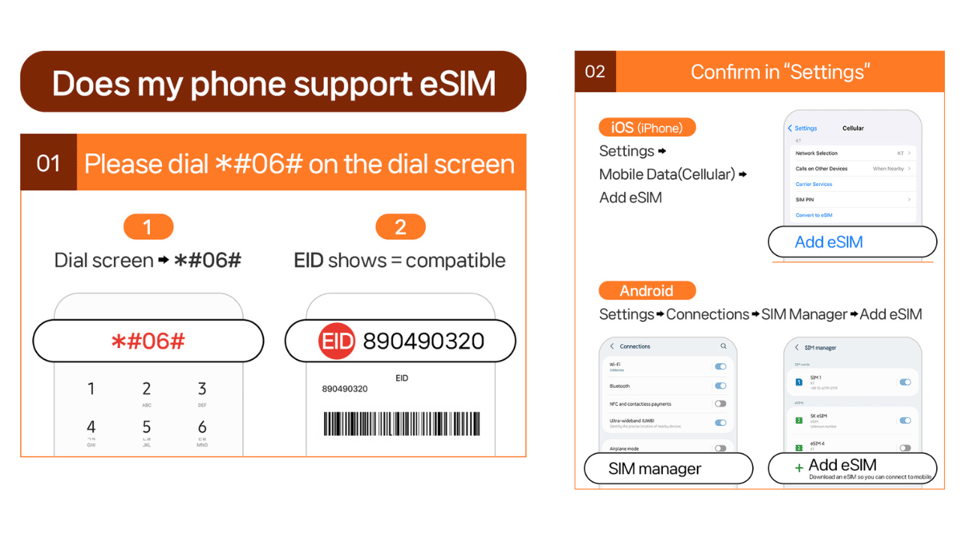
- Check eSIM compatibility first using your phone’s EID (see FAQ).
- Ultra vs Lite: Ultra is unthrottled; Lite caps speed to 10Mbps.
- Hotspot works, but with limitations (and plan duration affects the listed hotspot data).
- 5G may switch to 4G indoors, underground, or in crowds.
eSIM setup in Japan: your QR code does not match the voucher
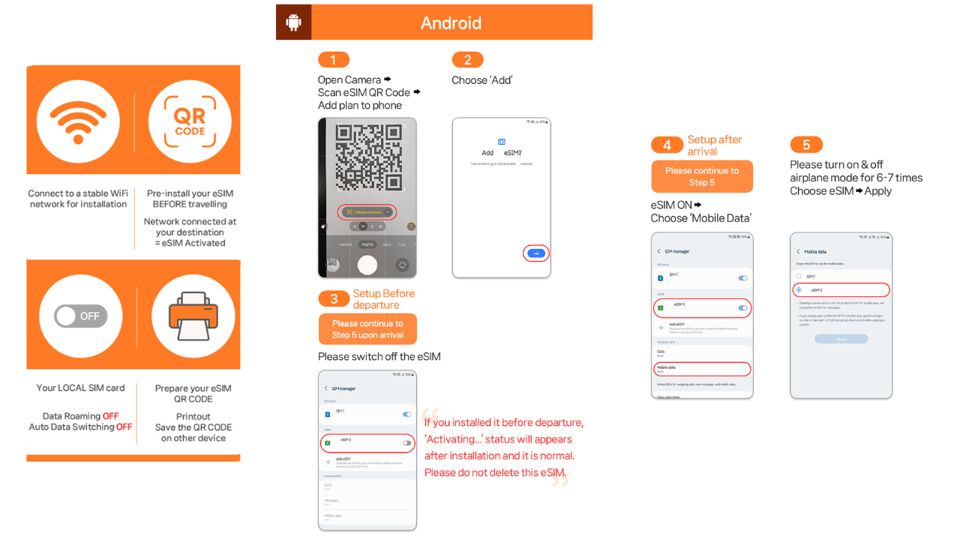
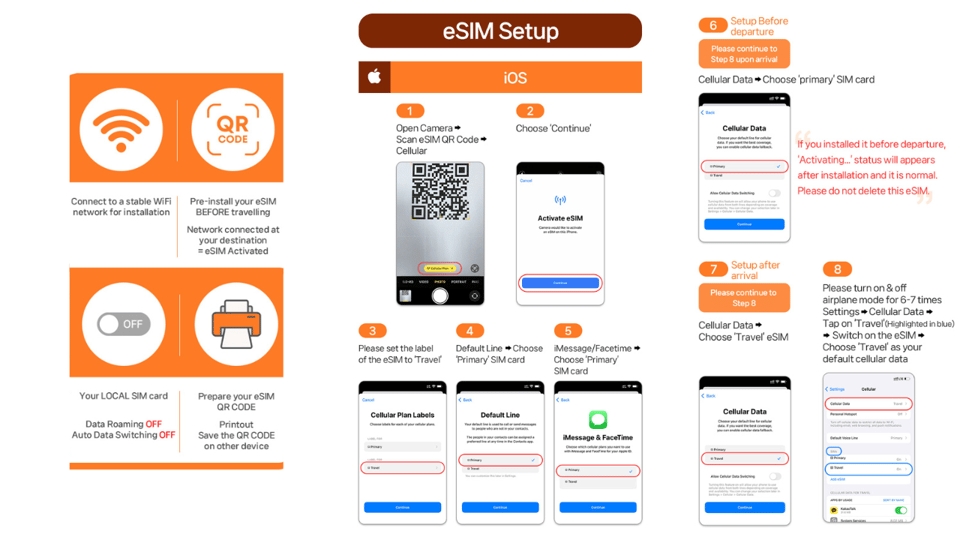
Let’s make the setup painless. The QR code shown on the GetYourGuide voucher is not the one you need for the eSIM. Instead, the correct eSIM QR code is sent to you by email one day before your activity date. That means you should save a little time the day before your trip to make sure you can access your email inbox and keep it handy.
Before you buy, do two quick checks on your phone. First, confirm your phone is unlocked for use with a foreign SIM/eSIM. Second, confirm your device supports eSIM by checking for an EID value: dial #06# and see if EID appears. If you don’t see EID, this won’t work on your device.
When the QR code arrives, the practical workflow is simple: you scan the eSIM QR, install the eSIM, and then connect to the local network once you’re in Japan. If you see a message like QR code is invalid, don’t panic. Go into your phone settings and check whether a new eSIM shows up there (on iPhone: Settings > Cellular; on Android: Settings > Connections > SIM Manager). If a new eSIM appears, you’re usually very close—then follow the steps to activate.
If it still doesn’t work, the plan is to contact the supplier directly (the info provided points you to reach them via email or WhatsApp). This is a case where fast help beats guesswork, especially right after arrival.
You can also read our reviews of more tours and experiences in Tokyo.



Ultra vs Lite: what the 10Mbps cap really means for a trip
You choose between two plan styles, and the difference is about how “fast” your unlimited data feels.
Ultra: unlimited local data, no throttling
The Ultra plan is listed as unlimited 5G/4G local data with no throttling. That’s the better fit if you’ll do heavy streaming, frequent map use, uploading photos, or video calls (though remember: voice calls and SMS aren’t included). With unthrottled data, you’re less likely to notice slowdowns during busy times.
Lite: unlimited data, but max speed 10Mbps
The Lite plan is also unlimited local data, but it caps max speed at 10Mbps. For most day-to-day travel tasks—maps, messaging apps, web browsing, and social media scrolling—10Mbps often feels fine. But if your trip includes lots of high-bitrate video streaming or real-time uploading, you may feel the limit during peak hours.
Duration choices (and why that matters)
- Ultra: 3 to 30 days
- Lite: 3 to 10 days
So Lite can be a great value for a short trip, while Ultra is the safer bet when you’ll be in Japan longer or you just want the “set it and forget it” feeling.






KDDI(au) coverage and the subway reality check
This eSIM runs on KDDI(au) networks in Japan. That’s a big deal because it’s not a random roaming agreement—KDDI is a major provider, and it tends to deliver solid coverage across the places you’ll actually go: city streets, train areas, and lots of common tourist zones.
One of the most reassuring details from the provided feedback is signal performance. People describe signal available even on the subway and coverage that feels consistent across places where mobile service often gets shaky. Of course, Japan trains and stations can be complicated radio environments, and even with strong networks, you can’t guarantee 5G everywhere. Still, the reported experience suggests this plan isn’t fragile.
Also keep the built-in reality check in mind: 5G may switch to 4G depending on your exact location. Indoors, underground, or in crowded areas, you’ll likely see 4G more often. That’s not a fault of the eSIM—it’s how mobile networks behave.
Hotspot sharing: when unlimited turns into limits
Hotspot is supported, but with limitations. That means you can share the connection with another phone or a tablet, and people report being able to share with other devices. For many travelers, that’s enough to cover a second device without buying another SIM.
Here’s the part you should plan around: the information provided includes a set of hotspot data amounts tied to the plan duration (examples shown include 3GB for 3–4 days, 4GB for 5 days, and up to 30GB for the 30-day option). Even though the plan is described as unlimited local data, hotspot use is the area where limitations show up clearly.
Practical advice: if you only need hotspot for maps on a second device, you’ll probably be fine. If you plan to use hotspot for heavy video streaming on a laptop, expect to run into those limits sooner.
Day-by-day connection plan: timing, activation, and troubleshooting
This is an eSIM, so you don’t get service until you activate it in Japan. The key point: the eSIM connects to the local network after you arrive in Japan. So you can’t rely on it while you’re still abroad unless you activate early in the way your phone allows. The safest approach is to treat it like a “Japan-only” connection.
What to do when you land
When you arrive, install and activate the eSIM (following the setup guide if needed). Then check that you’re connected to the KDDI(au) network. If you’re expecting 5G but you only see 4G, that can be normal indoors or in a station area—walk outside if you need the best signal.
What if you get stuck with QR code issues
If you see a QR code is invalid message, don’t waste hours re-scanning the same code blindly. Check whether the eSIM appears in your device settings:
- iPhone: Settings > Cellular (look for the new eSIM)
- Android: Settings > Connections > SIM Manager (look for the new eSIM)
If the eSIM shows, you’re usually just one step away. If it doesn’t, contact the supplier using the email or WhatsApp route provided.
Quick device habits that save time
- Keep your email open until the correct QR arrives the day before.
- Install the eSIM within the 30-day window after purchase.
- Don’t plan on SMS-based logins to work automatically, since SMS and voice aren’t included.
Price and value: is $10 a smart deal?
At $10 per person, this is priced like a “buy once and stay connected” travel product. The value is strongest when you want local unlimited data and don’t want the hassle of a physical SIM.
Here’s how I’d weigh the value for your specific trip:
This is strong value if you…
- Want unlimited 4G/5G local data for maps, messaging apps, and browsing
- Prefer an easy setup with a QR code
- Need service that’s described as working well even on subways
- Are traveling with one or two phones and want hotspot sharing
This may be less ideal if you…
- Need voice calls or SMS (not included)
- Will depend on hotspot for heavy laptop use (hotspot has limitations)
- Need a very specific travel duration and don’t fit the Ultra/Lite day ranges
Also consider that if your trip includes lots of indoor time (museums, malls, long station waits), your experience may lean more toward 4G than 5G. The plan is still useful, but don’t expect constant 5G bars everywhere.
Who should book this Japan eSIM plan (and who should skip it)
This plan makes sense for a lot of Japan visitors because it targets the biggest pain point: staying connected without shopping for a SIM after you arrive.
Best fit
- You want easy, fast data for navigation and everyday apps
- You’re fine relying on data-based communication (WhatsApp/LINE-like apps, email, web)
- You want the option of Ultra for the most consistent speed or Lite to keep costs down on shorter trips
Consider skipping or double-checking
- You require SMS for important two-factor logins tied to phone numbers
- You plan to run your laptop on hotspot for long streaming sessions
- You’re not sure your phone supports eSIM (checking for EID is worth doing before purchase)
If you travel in a group or you’re sharing a single hotspot, the ability to tether is a plus—but keep an eye on the hotspot limitations tied to your chosen plan duration.
Should you book this Japan eSIM plan?
If your main goal is simple: unlimited local data in Japan with a quick QR setup—then this is an easy yes to consider. The strong points are clear: unlimited 5G/4G local data, KDDI(au) network coverage, and setup that people describe as working smoothly, even in subway environments.
Book Ultra if speed consistency matters to you or you’re staying longer. Book Lite if your trip is shorter and you’re okay with a 10Mbps cap.
The only big reason to pause is if you truly need calls or SMS, or if you’re planning heavy hotspot use. If that’s your situation, you might need a different setup.
FAQ
Where does the correct eSIM QR code come from?
The QR code on the GetYourGuide voucher is not the eSIM QR code. The eSIM QR code is delivered separately to you via email 1 day before the activity date.
When should I install and activate the eSIM?
The eSIM will connect to the local network after you have arrived in Japan. Also, the eSIM QR code must be installed and activated within 30 days of purchase.
What should I do if I see a QR code is invalid message?
Check your phone settings to see whether a new eSIM appears (iOS: Settings > Cellluar; Android: Settings > Connections > SIM Manager). If you’re still stuck, contact the supplier via the email or WhatsApp information provided.
How can I tell if my phone supports eSIM?
Dial #06# on your phone and check whether EID shows. If EID is not showing, your device is incompatible with eSIM.
Can I use this eSIM for calls and SMS?
No. The plan lists voice & SMS: N/A, so you’ll rely on data for communication apps.
Can I share the connection with a hotspot?
Yes, hotspot sharing (tethering) is supported, but it has limitations depending on the selected plan.
Will I be able to get a refund after the QR code is sent?
Refunds are not accepted once the eSIM QR code has been sent. The cancellation policy provided also says cancel up to 24 hours in advance for a full refund.