REVIEW · TOKYO
Unlimited WiFi Router – Haneda Airport (Tokyo) Pickup
Book on Viator →Operated by Vision Inc. · Bookable on Viator
Getting online at Haneda is a real stress saver. This Wi‑Fi pickup gets you a 4G LTE unlimited router right at Tokyo’s airport, so you can land and start using maps, messaging, and ride planning immediately. Two things I like a lot: the long pickup window (from early morning to late night) and the fact that it comes with a power bank so your phone is not fighting low-battery panic.
The main thing to watch is the data rule. Even though it’s described as unlimited, the service says high speed is limited to 3GB per day, so heavy video streaming may slow down after you burn through the daily allowance.
In This Review
- Key Things To Know Before You Go
- Haneda Wi‑Fi Pickup: The Part That Actually Matters
- Where you pick it up (Terminal 3)
- Where you pick it up (Terminal 2)
- What’s in the Package, and Why It’s More Than Just Wi‑Fi
- Your First Hour After Landing: Using It Like a Pro
- How the daily speed limit affects you
- Connectivity Across Japan: What You Can Rely On
- Returning the Router: Don’t Get Tricked by Time Windows
- Terminal 3 late-night return box
- Terminal 2 return counter hours
- A helpful tip: where to drop it off
- Price and Value: Is It Worth $14.48?
- Who This Works Best For
- Potential Headaches (and How to Avoid Them)
- Signs, counter visibility, and finding the right spot
- Delays and staff communication
- Return timing surprises
- The Bottom Line: Should You Book This Haneda Wi‑Fi Router Pickup?
- FAQ
- What are the pickup hours at Haneda Terminal 3?
- Where is the late-night return option for Terminal 3?
- What are the pickup and return hours at Haneda Terminal 2?
- How long does the rental Wi‑Fi router last?
- How much data do you get each day?
- How many devices can connect to the router?
- What’s included with the router?
- Is the pickup inside or outside airport security?
- Can I cancel for free?
Key Things To Know Before You Go

- Pickup is outside security at Haneda, so you can grab the router before you get trapped in terminal-to-terminal wandering.
- NINJA Wi‑Fi counter at Terminal 3: 2F Arrivals Lobby at Global WiFi x NINJA WiFi, open 06:30–23:45.
- Late-night return options are built in with a return box at Terminal 3 for the 23:45–06:30 window.
- Terminal 2 has its own counter hours (6:00–23:00) for pick up and return.
- You can connect multiple devices, with the details stating up to 10 devices in one place; elsewhere it also mentions up to 5, so double-check your confirmation.
- It lasts for multiple days (listed duration is about 3 to 30 days), making it a good fit for short city breaks or longer Japan trips.
Haneda Wi‑Fi Pickup: The Part That Actually Matters
This is one of those services that sounds simple, but the timing is the whole point. If you’ve ever tried to navigate Tokyo with spotty airport Wi‑Fi, you know how quickly it gets annoying. Here, the plan is to hand you a rental router so you can start using your phone right after you land.
You’ll collect the device at Haneda Airport with a clear goal: walk away connected. The pickup window is generous, and that matters if you have a late arrival, a morning flight, or you’re hopping between terminals. It’s also described as being near public transportation, which fits how most people move in and out of Haneda.
You can also read our reviews of more tours and experiences in Tokyo.



Where you pick it up (Terminal 3)
Terminal 3 is the one with the most detailed instructions. For pickup, look for the counter at:
- 2F Arrivals Lobby: Global WiFi x NINJA WiFi
- Hours: 06:30–23:45
There’s also a late-night return setup:
- Return box: 2F Arrivals Lobby: JAL ABC
- Hours: 23:45–06:30
That split is useful. If you’re returning around midnight, you won’t be stuck hoping a counter is staffed.
Where you pick it up (Terminal 2)
Terminal 2 is simpler. The instructions say pick up, return, and return box are at:
- Terminal 2, 2F: J WiFi & Mobile x Global WiFi
- Hours: 06:00–23:00
If your flight is during the day, Terminal 2 can be the easier option. If you’re arriving or leaving late, Terminal 3’s return box hours may be the better match.
What’s in the Package, and Why It’s More Than Just Wi‑Fi

The router setup is the star, but the extras are what make it practical for travel days. The materials list:
- The Wi‑Fi router (4G LTE hotspot style)
- USB cable and adapter
- Wi‑Fi pouch
- A power bank
That power bank is not just a nice touch. When you’re using your phone nonstop at arrival time (maps, translations, transit planning, checking your hotel), battery drain is one of the fastest trip-killers. Having a built-in backup lets you focus on getting oriented instead of hunting for a wall outlet.
The device is also described as connecting to multiple phones/tablets at once (details in the materials mention up to 10 devices in one place, and up to 5 devices in another). If you’re traveling as a family or a small group, I’d treat this as a “plan for enough, confirm for sure” situation. Your confirmation message is the best place to verify your actual device limit.
Your First Hour After Landing: Using It Like a Pro
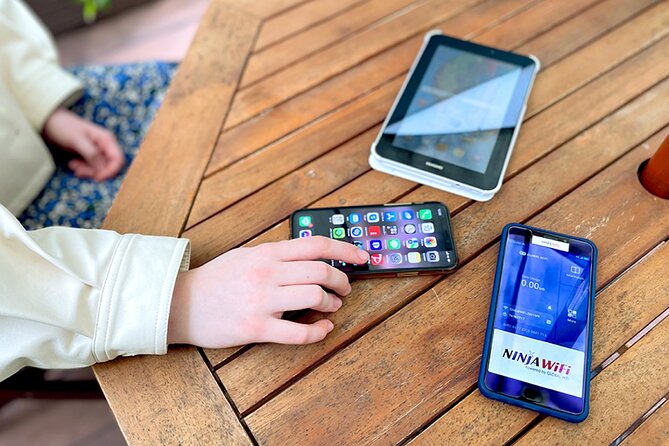
You don’t need a technical setup wizard moment. The idea is to start using internet as soon as you arrive. In practical terms, that means you can do the things that save time on Day 1:
- Pull up Google Maps for your route to the train or bus
- Check hotel address pins and transit steps without hunting for free Wi‑Fi
- Use messaging and ride info while you’re still at the airport stage
- Look up opening hours or transit notes before you commit to a direction
That’s especially helpful in Tokyo, where a lot of the frustration comes from small walking decisions. With stable internet, you can correct course quickly, instead of walking the long way because your app didn’t load.





How the daily speed limit affects you
Here’s the key limitation: high speed data is limited to 3GB per day. The service is described as unlimited, but the “high speed” cap means your day gets slower if you’re doing heavy streaming.
So plan your usage the way you’d actually travel:
- Great for navigation, messaging, web browsing, social apps
- Watch YouTube if you must, but think of it as “on the go occasionally,” not “all day in HD”
- Download what you can over your hotel Wi‑Fi if you have it, then stream less while you’re mobile
If your travel style is mostly maps and messages, this will feel plenty fast. If your style is long-form video nonstop, you’ll want to manage expectations.
Connectivity Across Japan: What You Can Rely On

The materials frame this as Wi‑Fi access anywhere in Japan with a 4G LTE connection. In real-world terms, that’s what you want when you’re doing multiple neighborhoods, day trips, or switching transit lines.
One of the best benefits of a rental hotspot is that it reduces the “where’s the Wi‑Fi?” question. You stop treating the internet like a rare resource and start using it like normal phone service.
The router is also described as usable for up to 90 days. That’s a big window if you end up extending your trip or if you travel more slowly than planned. Still, your actual booking duration is the guide for your return date.
Returning the Router: Don’t Get Tricked by Time Windows

Return rules can be where good trips turn into stressful ones, so it helps that this service lays out time-specific return options.
Terminal 3 late-night return box
If you’re using Terminal 3 and you’re returning between 23:45 and 06:30, the instructions point you to the return box at 2F Arrivals Lobby: JAL ABC. That’s a big deal because it means you don’t have to guess if staff are available at that hour.
Terminal 2 return counter hours
If you’re working with Terminal 2, the counter hours run 6:00–23:00. If your timing is close to closing, it’s smart to build in a buffer so you’re not rushing right before security.
A helpful tip: where to drop it off
One practical point in the guidance is that the drop-off location can match the pickup area. Still, the airport is confusing when you’re tired. I’d keep your phone on the router until you’ve placed the device in the correct spot.
Price and Value: Is It Worth $14.48?

At $14.48 per person, this is positioned as an affordable way to avoid roaming costs and avoid airport Wi‑Fi problems. The value is strongest when you:
- Plan to use maps and messaging daily
- Travel with at least one other person, since one hotspot can cover multiple devices
- Care about not searching for Wi‑Fi in transit stations, train transfers, and hotel lobbies
The one value trade-off is the daily speed limit. If your trip includes a lot of streaming on the go, you may feel the 3GB/day cap. If you use Wi‑Fi the way most tourists do—navigation, photos upload later, social browsing, chat—this usually feels like a smooth and reliable solution.
Also consider logistics costs. One wrong turn in Tokyo can burn an hour and derail a day. A router that keeps your directions accurate can pay for itself fast.
Who This Works Best For
This Wi‑Fi pickup is ideal if you want:
- Fast setup on arrival at Haneda
- Reliable mobile internet during city travel
- A simple, self-contained service where you control your own pace
It’s also a good fit for people who don’t want to waste energy bargaining for Wi‑Fi at cafes or chasing weak airport signals. If you’re the planner type in the group (the one who always knows where to go next), the router becomes a quiet superpower.
On the other hand, if your travel style is “I’ll be offline most of the time,” you might not get full value. And if your group needs lots of devices with heavy streaming, you’ll want to double-check the device limit and manage the daily speed cap.
Potential Headaches (and How to Avoid Them)

No travel service is perfect, and this one can have a few friction points.
Signs, counter visibility, and finding the right spot
Airport signage can be tricky, especially when you’re juggling jet lag. If it’s hard to spot the counter, the easiest fix is to look for the exact counter name and then confirm you’re in the correct terminal level. The instructions specify Arrivals Lobby counters at certain floors, which you should treat as your map.
Delays and staff communication
If your flight gets delayed, your pickup timing can shift. One negative scenario described includes stress and communication problems when things didn’t line up smoothly. The best defense is simple: plan a little buffer time if you can, and keep your reservation details ready so there’s less back-and-forth.
Return timing surprises
Because return options are time-based, you should not assume the counter is open at all hours. Match your return plan to the terminal and the listed time window.
The Bottom Line: Should You Book This Haneda Wi‑Fi Router Pickup?
If you’re landing at Haneda and want your first hour in Tokyo to feel normal, this is a strong choice. The long pickup window, the power bank included, and the ability to start using your phone right away are the big reasons it feels worth it.
I’d book it if you want dependable navigation and you’ll use your internet mostly for planning, messaging, and everyday browsing. I’d think twice if your group streams lots of video all day or if you’re likely to hit complicated arrival or departure timing. In that case, confirm the device limit on your confirmation and keep the 3GB/day high-speed cap in mind.
If you want the least stressful Japan experience, get your bearings fast, then let the router do the work.
FAQ
What are the pickup hours at Haneda Terminal 3?
Terminal 3 pickup hours are 06:30–23:45 at the Global WiFi x NINJA WiFi counter in the 2F Arrivals Lobby.
Where is the late-night return option for Terminal 3?
For Terminal 3, there is a return box at 2F Arrivals Lobby at the JAL ABC counter for 23:45–06:30.
What are the pickup and return hours at Haneda Terminal 2?
Terminal 2 pickup and return are listed as 6:00–23:00 at the J WiFi & Mobile x Global WiFi counter on 2F.
How long does the rental Wi‑Fi router last?
The rental duration is listed as approximately 3 to 30 days, and the service description notes up to 90 days.
How much data do you get each day?
High speed data is limited to 3GB per day, even though the service is described as unlimited.
How many devices can connect to the router?
The materials include a device limit that is described as up to 10 devices, and another part mentions up to 5 devices. Check your booking confirmation for your specific limit.
What’s included with the router?
It includes the Wi‑Fi router, USB cable, adapter, Wi‑Fi pouch, and a power bank.
Is the pickup inside or outside airport security?
The pickup and return counters are located outside of airport security.
Can I cancel for free?
Yes. You can cancel up to 24 hours in advance for a full refund.